AI Training
Hands-on AI training for individuals, teams, and organizations, built around your tasks, tools, and learning goals.
Build real software with AI, and learn where not to trust it.
Vibe coding means building software by describing what you want in plain language and directing AI coding tools such as Cursor, Claude Code or GitHub Copilot to write the code. You stay in charge of what gets built; the AI does much of the typing.
Vibe coding is building software by describing what you want to an AI coding tool, such as Claude Code or Cursor, then testing and refining what it produces. You can start without programming experience. Fusion Interactive’s coaching teaches the parts that matter after the code appears: checking behaviour, debugging, using Git as a safety net, and knowing when to call a developer.
Hands-on coaching for people who want to turn an idea into working software with AI coding tools.
You learn this by building. We set up the tools, choose a project small enough to finish, and work through the prompts, bugs, tests and tradeoffs together. The useful skill is not getting AI to produce code. Any of these tools will produce code. The skill is learning how to inspect the result and recover when the confident machine is wrong.
StagePlot Pro began as a weekend experiment. Arthur had a problem he knew from live production: getting a clear stage plot and input list into the right hands before a show. He built a first version, shared it with a group of people who deal with stage plots and input lists, and signups started coming in. It now has over 1,600 accounts. That is the shape of a good first project: one real problem, a version small enough to ship quickly, and real users telling you what to build next.
Most first projects fail for the opposite reason. They try to do everything at once, the AI generates a large tangle of code, and nobody can tell which part broke. We keep the steps small. Each change is described clearly, generated, tested and committed before the next one starts. Git becomes your safety net: when something goes wrong, you can see what changed and go back.
We teach you how to read what the AI produced, even if you do not write code yourself. You learn to ask it to explain its work, to check with a quick test that a feature does what you asked, and to recognise the warning signs, such as a fix that breaks something else or a confident answer about a library that does not exist.
We are honest about limits. Vibe coding is excellent for prototypes, internal tools and first versions you want to test with real people. Anything that handles payments, sensitive data or many users needs more care, and at some point an experienced developer should review it. Part of what we teach is recognising that point. When a prototype needs a production build, our app development service can take it from there.
A typical first session covers setup and a first working feature. We install the tool you will use, create a project with version control and write a short description of what you want to build. Then we build one small piece together: a page, a form or a calculation. You see how the AI responds to a clear instruction and to a vague one, how to test what it made and how to undo a change that went wrong. By the end you have something running on your own machine and a list of next steps small enough to try on your own before the next session.
Sessions suit non-technical founders with an idea, people who want to build small tools for their own work, and developers who want to use AI coding tools more effectively. We collaborate remotely and can arrange in-person meetings in the GTA.
Coaching is quoted before work begins. If your prototype turns into a production build, that work follows our tiers: Starter at $2,500–$5,000 CAD over 2–4 weeks, Professional at $5,000–$15,000 over 4–8 weeks, and Enterprise at $15,000+ over 8–16+ weeks.
The questions we work through before quoting, so the first release does one job well.
Vibe coding describes building software by directing an AI coding tool in natural language. You describe a change, inspect the generated code and behavior, and continue through feedback. It lowers the barrier to starting a project, but it does not remove the need to understand what the software does.
We teach through a small real build. A focused internal tool or prototype gives you a complete workflow to reason about. Trying to begin with a large production platform creates too many moving parts before you have learned how to review a change.
You learn to name the user, the input, and the expected result. Break the work into changes you can test. When something fails, provide the actual symptom and enough context to reproduce it instead of asking the assistant to rewrite everything.
We also cover the project structure, local development, and version control needed to keep work recoverable. A saved working state lets you compare changes and avoid losing progress when the AI takes a wrong turn. You do not need to master every framework to learn that habit.
A feature should behave correctly with empty fields, wrong inputs, different roles, and failed connections. We teach you to inspect those paths and check that the build runs. Generated code can look convincing while exposing data or mishandling an exception.
We identify where experienced technical review belongs. Authentication, payments, sensitive information, and public deployment raise the consequences of a mistake. Learning when to ask for that review is part of becoming a capable builder, not a failure of the method.
Bring a small problem, a few example inputs, and a description of a useful finished result. We agree on the coding tool and setup based on your experience. Avoid a first project whose usefulness depends on five external systems and a large migration.
The training scope should name the project, learning goals, session format, and follow-up. You leave with working progress and a method for reviewing the next change. A prototype still needs an appropriate launch review before real users or sensitive data depend on it.
Jobs this service is built for. Named projects link to their case studies; the rest are typical starting points, not past results.
StagePlot Pro began as a weekend experiment for a live-production problem, was shared with people who needed it, and now has over 1,600 accounts. It is the model for a good first project: one problem, shipped small, improved from real use.
Choose one painful problem and build a version small enough to put in front of real users, so you learn whether the idea works before paying for a full build.
Turn a repeated spreadsheet or reporting job into a small tool with tests and version control, built by the person who knows the task best.
Use AI to prepare and review routine code while tests and human judgment remain the safety net.
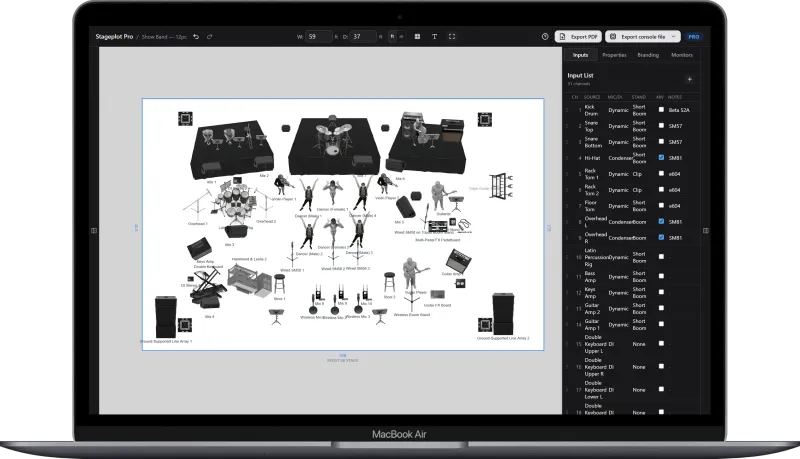
StagePlot Pro
SaaS · Live Production
Our own stage plot software, built around a working production problem and growing through search.
Read the StagePlot Pro case studyThirty minutes. Two prototypes ready at the deadline. An honest look at what building with AI can do, and what still needs another pass.
Arthur Kerekes Founder, Fusion Interactive In the room at Go West
Bring practical AI to your teamDefine the user, input, and useful finished result. Match the learning goal to your experience and available time.
Prepare the agreed AI coding tool, local project, and version control. Learn the concepts needed to understand this build.
Make small changes, review generated code and behavior, and test ordinary failures. Use reproducible examples to work through bugs.
Identify the next steps and any included follow-up. Separate a working prototype from the checks needed before real users depend on it.
Vibe coding is the practice of building software by describing what you want in natural language and letting AI coding assistants generate the code. Instead of writing code line by line, you direct AI tools like Cursor, Claude Code, or GitHub Copilot to build features, fix bugs, and create entire applications, then check what they produce.
We work with Cursor (an AI-powered code editor), Claude Code (AI coding from the terminal) and GitHub Copilot (AI assistance inside your editor). We help you set up the one that fits how you like to work.
No. You will learn to read and question what the AI produces, and a basic idea of how software fits together helps. We cover what you need as you build.
Yes, within limits. Prototypes, internal tools and first versions are a good fit. Software that handles payments, sensitive data or many users needs an experienced developer to review it, and we teach you to recognise that point.
One-on-one vibe-coding coaching is $200 per hour. If your prototype becomes a production build, that work follows our project tiers: Starter at $2,500–$5,000 CAD, Professional at $5,000–$15,000 and Enterprise at $15,000+.
Book a free 30-minute call and bring the idea. We collaborate remotely and can arrange in-person meetings in the GTA.
You can begin without traditional programming experience. We introduce the project concepts needed for your build, such as files, data, and APIs. Understanding those concepts helps you give better instructions and recognize when the generated result needs correction.
It can, after the relevant checks and technical work. A prototype that works locally has not established secure access, dependable recovery, or safe handling of real data. We help you identify what needs review before deployment and when an experienced developer should take responsibility.
We choose the tool around your setup, experience, and project rather than requiring one brand. The session includes the instructions, review, and debugging habits you can transfer between tools. Any subscriptions or paid services should be agreed before the session.
Project complexity, setup, number of participants, session format, and follow-up affect the scope. We choose a realistic learning project before quoting. A production build or specialist security review is a separate engagement from learning to create a prototype.
Hands-on AI training for individuals, teams, and organizations, built around your tasks, tools, and learning goals.
We build fast, clear websites that answer real buyer questions and give your team something useful to operate.
We build focused web applications, internal tools, and client portals around real workflows.
Tell us about the vibe coding work you have in mind. We will come back with next steps, or a straight answer if a simpler tool would do the job.
Book a free 30-minute call